
Four Calculators in One:
Scientific, Graphing, Financial & Statistical
Transform the computers in your classroom or computer lab into powerful tools for teaching & learning mathematics.
Free 15-Day Trial (Windows/Mac/Web)
Free Trial Download (Windows Mobile/Handheld)
Portrait 4 Graphing & Calculating Features:
Tracking, Zoom, Color, Labels
Improve Student Achievement and lower the total-cost of ownership.
Portrait 4:
Improves teacher efficiency
Eliminates need for graphing calculators
Encourages use of other software applications
Portrait 4's intuitive approach to graphing & calculating appeals to a much broader range of learning styles. Its 20 minute learning curve reduces professional development and saves class time everyday. Easily copy spreadsheet data, graph it in vivid color then paste it into assignments & presentations.
Portrait 4 is perfect for school, business & everyday life.
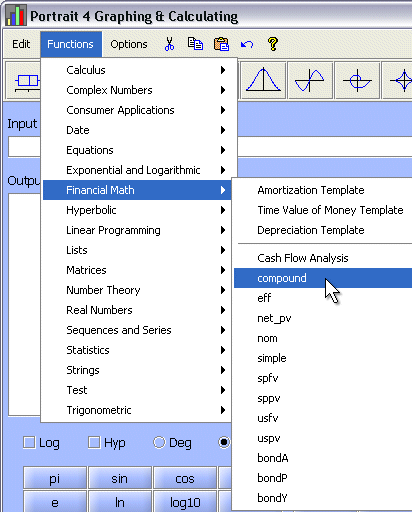
One: Reclaims Class Time for Teaching Math
Portrait 4 reclaims valuable class time for teaching math. Greater teacher efficiency and productivity improve student achievement in mathematics and reduces Total Cost of Ownership.
Two: Eliminates Need for Graphing Calculators
Portrait 4 eliminates the need for traditional graphing calculators, the savings realized can be directly applied to funding and sustaining school technology plans. This helps lower Total Cost of Ownership.
Three: Encourages Use of Other Software Applications
Portrait 4 encourages students and teachers to explore other applications, especially Word and Excel. Increasing the amount of time and the range of activities for which students and teacher are productively using computing power decreases Total Cost of Ownership.
| Platform | Pricing ($US) |
|---|---|
|
Windows, Mac OSX, Linux or Web-based |
Single Copy - Only $49.95 |
|
Windows Mobile |
Single Copy - Only $49.95 |
|
Nova5000 |
Portrait 4 - Graphing & Calculating is already installed on a new Nova 5000! |
Click the link below to register:
Free 15-Day Trial of Portrait 4 Graphing & Calculating (Web-based)
Free 15-day Trial of Portrait 4 Graphing & Calculating (Windows Mobile)
Throughout the installation you must have:
your desktop computer connected to the Internet
your Pocket PC connected to your desktop computer with ActiveSync running
the time and date on your Mobile Windows device set correctly
Click Here to Download the Installer
When prompted for a save location, choose a location that you will remember, like the Desktop.
Once the portrait4_trial.exe file is on your PC, browse to its location and double-click on it.
When prompted, click on 'UnZip'.
This will create a folder into which the contents of the zip file are extracted. The default folder is 'portrait4_trial'.
Once unzipped, the setup should start automatically.
(If it doesn't, browse to the folder you just created and double click 'Setup.exe')
The installer process will then guide you through the rest of the installation.